

The Fingerprint JavaScript agent and mobile SDKs collect device attributes and identify visitors by making HTTP network requests to Fingerprint servers. In the browser, ad blockers and privacy-focused browsers can block JavaScript agent requests, and VPN or DNS-level blocking can affect requests from both the browser and mobile SDKs, preventing you from identifying all of your visitors. In this article, we will explain how to protect Fingerprint requests from being blocked by proxying them through your own domain.Documentation Index
Fetch the complete documentation index at: https://docs.fingerprint.com/llms.txt
Use this file to discover all available pages before exploring further.
Which requests are blocked and how?
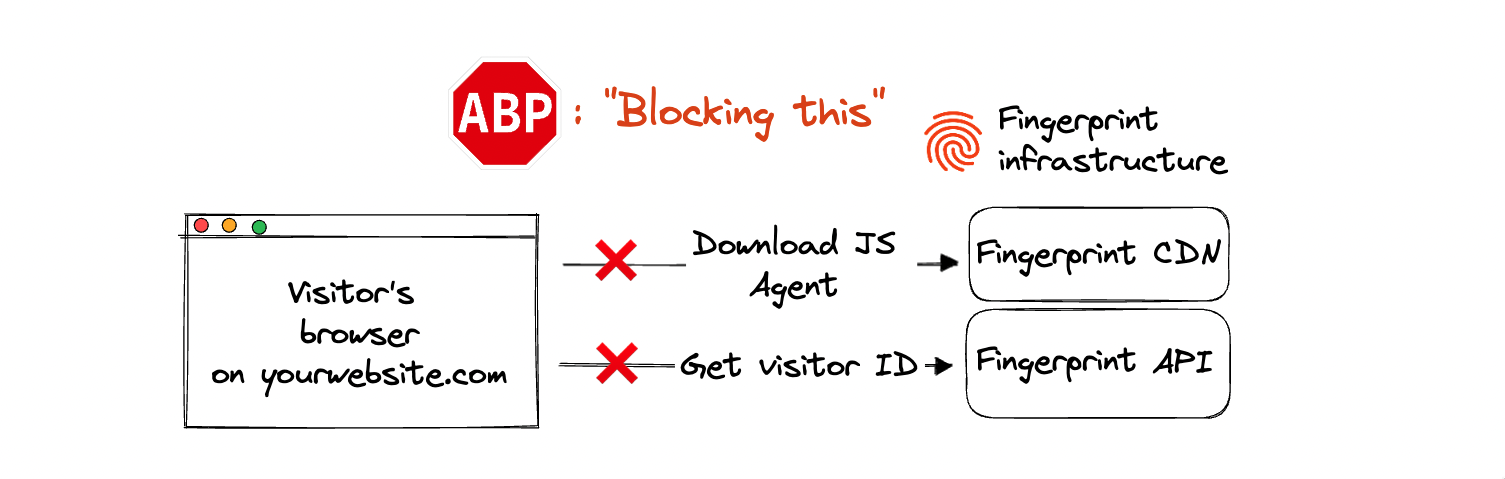
- The JavaScript agent downloads the most recent device intelligence algorithm from our CDN (even if you installed it using an NPM library).
- Client agents send the collected device attributes to our Identification API and receive the visitor ID in return.
- Client agents can make additional requests to improve the accuracy of identification.
fpjscdn.net, api.fpjs.io, fptls.com) and block all requests matching those domains. Some VPN providers can also block our domains on a DNS level, affecting both browser and mobile traffic.
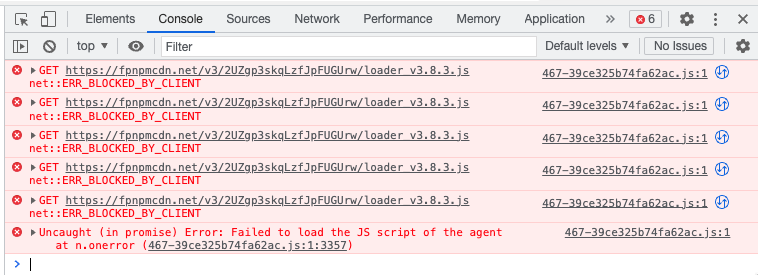
You can examine blocked JavaScript agent requests from your browser’s developer tools (in the Console or Network tab). The error will usually show up as net::ERR_BLOCKED_BY_CLIENT or Failed to load the JS script of the agent.
Proxying requests through your domain
The best way to protect Fingerprint requests from getting blocked is to proxy them through your own domain. Instead of calling Fingerprint APIs directly, the JavaScript agent or the mobile SDK calls a proxy function hosted on your own domain or subdomain — for example,metrics.yourwebsite.com — which then passes the request to the Fingerprint API.
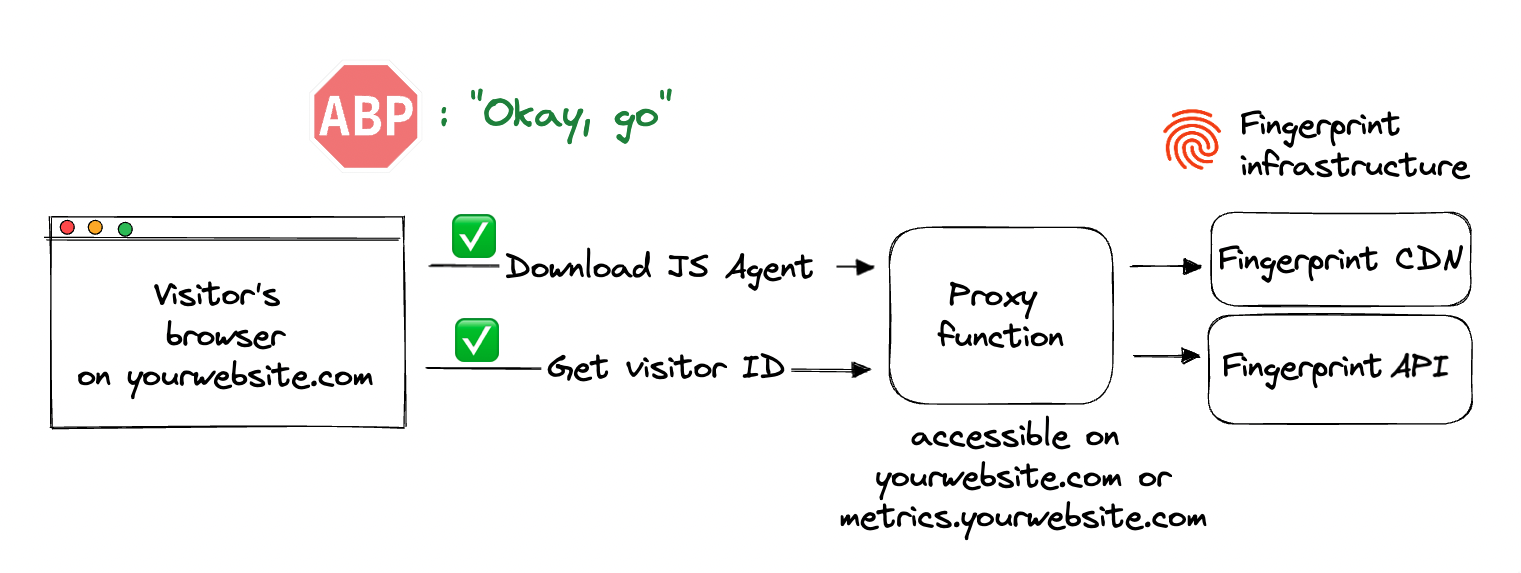
- The requests are not blocked by ad blockers.
- Cookies created by the request are considered “first-party”. They can be saved in the visitor’s browser in situations where third-party cookies are blocked (for example, Safari blocks all third-party cookies). They can also live longer (in some browsers) than cookies not routed through your domain.
- Your usage of Fingerprint is harder to detect for fraudsters and bad actors.
- Custom subdomain setup: The proxy function runs on Fingerprint infrastructure and you just point your subdomain to it.
- Cloud proxy integrations: The proxy function runs in your cloud infrastructure.
Custom subdomain setup
Using Custom subdomain setup is both required and sufficient to avoid ad blockers and identify 100 percent of your visitors. It is available and highly recommended to all Fingerprint customers. The setup is largely automated. It consists of:- Registering your subdomain inside the Fingerprint dashboard.
- Adjusting your DNS records to point your subdomain to a proxy function running inside Fingerprint infrastructure.
- Adjusting your Fingerprint client configuration (JavaScript agent or mobile SDK) to use your subdomain.
Cloud proxy integrations
Setting up a cloud proxy integration typically involves deploying a Fingerprint-provided proxy function in your cloud infrastructure. Cloud proxy integrations have all the accuracy and coverage benefits of a Custom subdomain setup. Additional benefits include:- Cookie lifetime of up to one year (instead of 7 days) even in Safari 16.4 and higher, leading to maximum possible accuracy in all browsers.
- Insight and control over the identification requests in your own infrastructure. You can extend the provided proxy functionality with other services offered by your cloud provider, such as WAF, logging, and analytics.
- Cookie security: Both custom subdomain setup and cloud proxy integrations drop all the cookies sent from the origin website. With cloud proxy integrations, the proxy function code is open-source so this behavior can be transparently verified and audited.
- IPv6 support: Fingerprint Identification API only supports IPv4, but proxy integrations also support IPv6. Using a proxy integration, the JavaScript agent can use IPv6 to send identification requests.
- You can manage unlimited subdomains and paths and provide Fingerprint services to all your customers at any scale while benefiting from all the 1st-party integration improvements.
- Easy to meet compliance and auditing requirements.
| Integration | Required plan | Setup |
|---|---|---|
| Cloudflare Proxy Integration | Any Plan | Dashboard installation wizard — largely automated |
| AWS CloudFront Proxy Integration | Enterprise | Integration guide — manual steps required |
| Azure FrontDoor Proxy Integration | Enterprise | Integration guide — manual steps required |
| Akamai Proxy Integration | Enterprise | Integration guide — manual steps required |
| Fastly VCL Proxy Integration | Enterprise | Integration guide — manual steps required |
| Fastly Compute Proxy Integration | Enterprise | Integration guide — manual steps required |
Preserving first-party context
Cookies and other deterministic identification methods work better when used within the same website (first-party context) than when used across different websites (third-party context). To achieve maximum accuracy, use your cloud proxy integration in a first-party context.Host the proxy integration on the same domain as your website
If you want to identify visitors ondogs.com, your proxy integration should be available on the same registrable domain or its subdomain, for example dogs.com/metrics or metrics.dogs.com.
Proxying identification requests from dogs.com through a proxy integration hosted on metrics.cats.com will result in shorter cookie lifetimes and reduced accuracy.
Host the proxy integration on the same IP range as your website
While not technically required, we recommend hosting your proxy integration on the same cloud provider as your website to achieve the maximum possible identification accuracy in Safari.- Safari 16.4 and higher checks the IP addresses behind your website and proxy integration.
- If they are too different, it limits cookie lifetimes to 7 days.
Additional resources
- If you have a Content Security Policy (CSP) enabled on your website, then the CSP can also block requests from the JavaScript agent. See Content Security Policy (CSP).
- Safari browsers implement several measures to protect users from being tracked and these measures negatively impact identification accuracy. The negative impact can largely be reduced by setting up a proxy integration. For more information, please see Safari’s Intelligent Tracking Prevention.
- Blog: How can ad blockers be used for browser fingerprinting?